
此文章是Java后端接入微信登录功能,由于项目需要,舍弃了解密用户信息的session_key,只保留openid用于检索用户信息
后端框架:spring boot
小程序框架:uniapp
官方小程序登录流程图解(图取自官网)
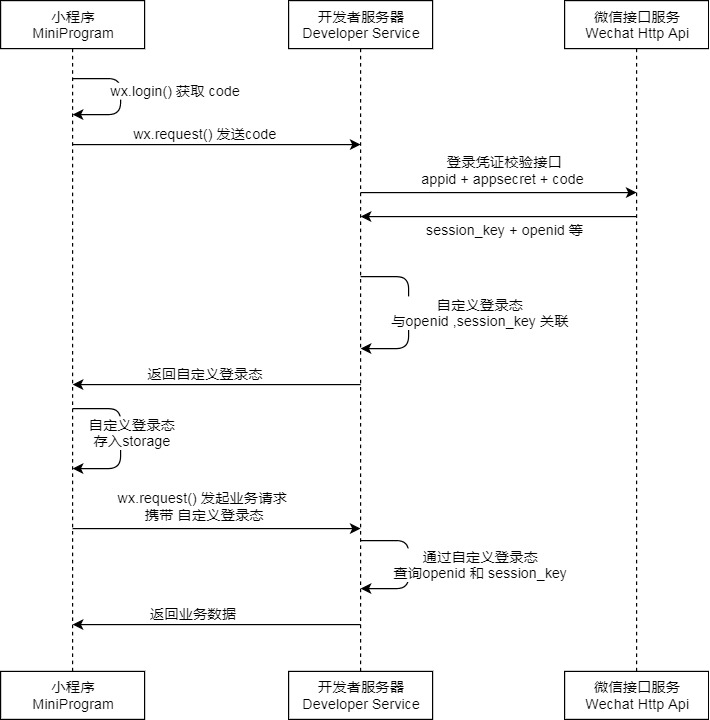
openid可以获取用户的基本信息(不同小程序中拥有不同openid)code是用户登录凭证,由微信服务器颁发给小程序;后端通过code向微信服务器请求用户的openid和session_key等信息。(code是一次性的,且时效为5分钟)unionid是相同的接入小程序登录(只保留 openid 登录功能)
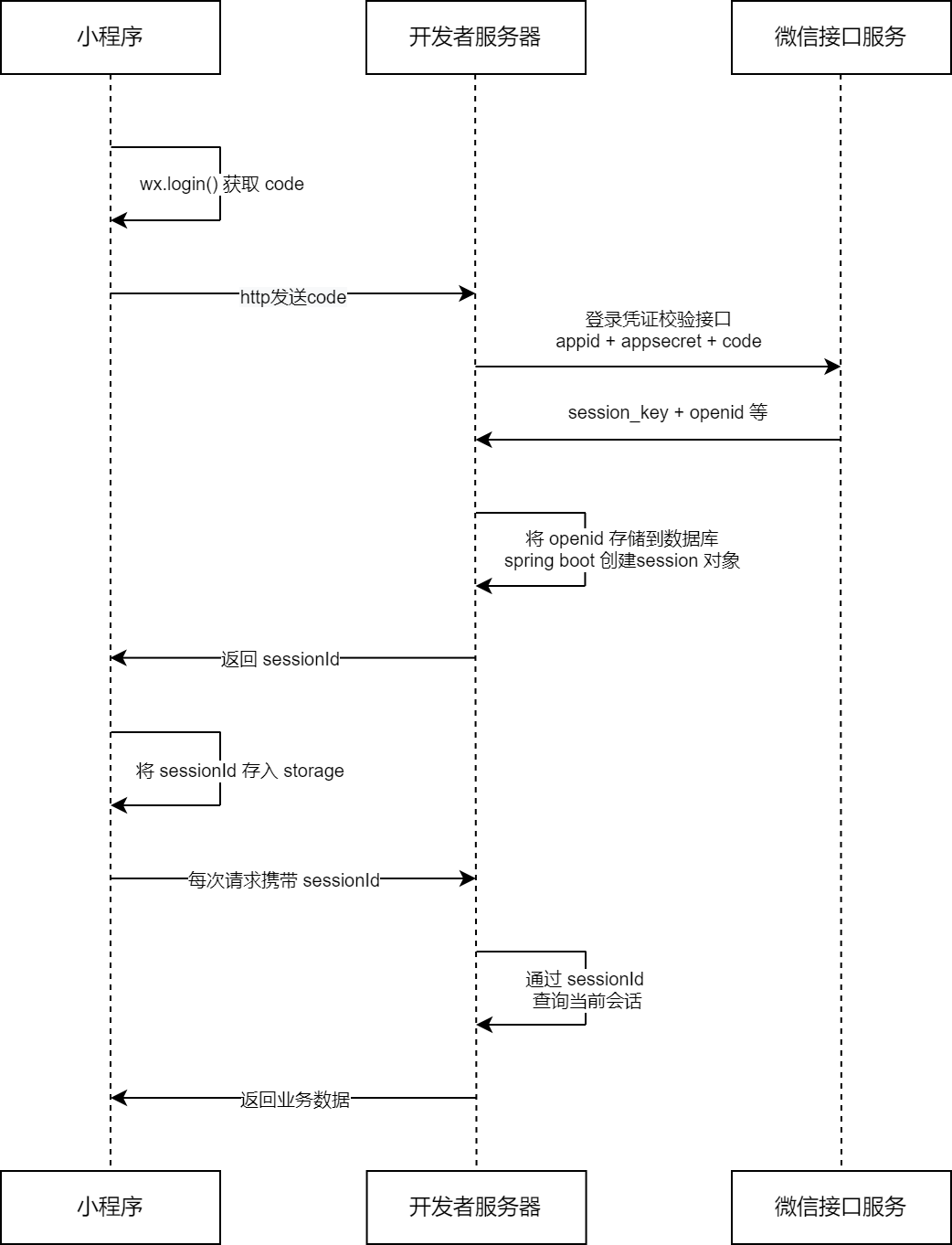
工具类
import cn.hutool.core.util.StrUtil;
import cn.hutool.http.HttpRequest;
import cn.hutool.json.JSONObject;
import com.redapple.project.common.ErrorCode;
import com.redapple.project.exception.ThrowUtils;

public class RequestUtils {

    // 获取AccessToken
    public static JSONObject getAccessToken(String appId, String appSecret) {
        String apiUrl = StrUtil.format(
                "https://api.weixin.qq.com/cgi-bin/token?grant_type=client_credential&appid={}&secret={}",
                appId, appSecret
        );
        String body = HttpRequest.get(apiUrl).execute().body();
        ThrowUtils.throwIf(body == null, ErrorCode.OPERATION_ERROR);
        return new JSONObject(body);
    }

    // 获取session_key和openid
    public static String getOpenIdByCode(String appId, String secret, String code) {
        String apiUrl = StrUtil.format(
                "https://api.weixin.qq.com/sns/jscode2session?appid={}&secret={}&js_code={}&grant_type=authorization_code",
                appId, secret, code
        );
        String body = HttpRequest.get(apiUrl).execute().body();
        ThrowUtils.throwIf(body == null, ErrorCode.OPERATION_ERROR);
        return body;
    }

}
登录实现
主要接收三个参数,分别是小程序的appi、appSecret、前端传来的code
这里通过工具类向微信接口服务发送jscode,返回openid
    public LoginUserVO WeChatLogin(String appid, String secret, String code, HttpServletRequest request) {
        // 获取session_key和openid
        String result = RequestUtils.getOpenIdByCode(appid, secret, code);
        System.out.println("result:" + result);
        // 提取openid
        String openid = new JSONObject(result).getStr("openid");
        // 这里是自己封装的方法,流程是如果openid为空则抛异常
        ThrowUtils.throwIf(openid == null, ErrorCode.NOT_FOUND_ERROR, "openid为空");
        // 查询openid是否存在
        QueryWrapper queryWrapper = new QueryWrapper();
        queryWrapper.eq("openid", openid);
        User oldUser = this.baseMapper.selectOne(queryWrapper);
        // openid不存在
        if (oldUser == null) {
            // 添加用户
            User user = new User();
            user.setOpenid(openid);
            user.setPhone("手机号未填写");
            user.setUserName("默认用户");
            boolean saveResult = this.save(user);
            if (!saveResult) {
                // 这里也是自己封装的方法,流程是抛自定义异常
                throw new BusinessException(ErrorCode.SYSTEM_ERROR, "注册失败,数据库错误");
            }
            // 记录用户的登录态
            request.getSession().setAttribute(USER_LOGIN_STATE, user);
            return getLoginUserVO(user);
        }
        // 记录用户的登录态
        request.getSession().setAttribute(USER_LOGIN_STATE, oldUser);
        // 用户存在,返回用户数据
        return getLoginUserVO(oldUser);	// 自己封装的方法,返回脱敏的用户数据
    }
uniapp框架
 登录查看全部
参与评论
手机查看
返回顶部