
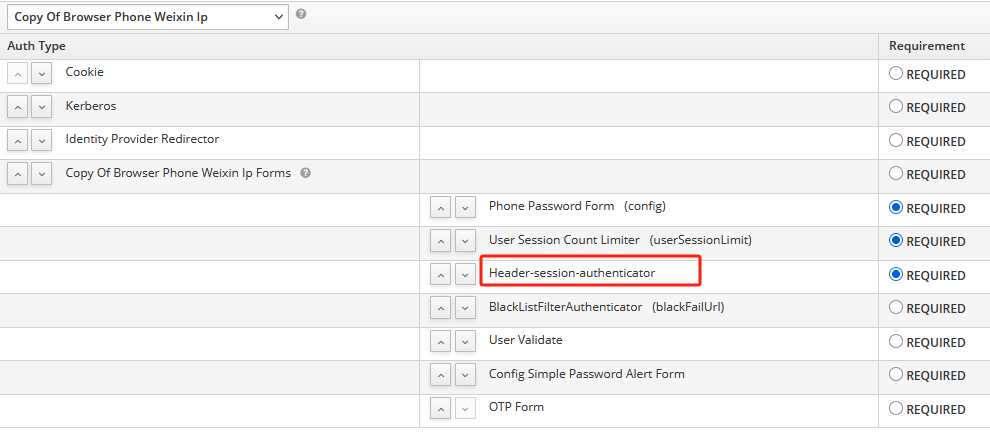
UserSessionModel做为用户登录过程中的一个会话,可以用来跨flow使用数据,这些数据被保存到内存里,在认证过程中可以被使用,今天的一个需求要求在登录时从请求头获取IP所在地并写到kafka里,要想实现这个需求,你可以在现有认证流程中修改代码,但不建议这样做,因为这种修改对原始逻辑会有破坏,keycloak提供了自定义认证流,并在后台可以灵活的配置。
从上面图中可以看到,这个登录的过程会经历多个认证流,在所有被开启的认证流执行完成后才算登录成功,而这些流程我们是可以进行按需开发并配置的,下面说一下keycloak认证过程的几大事件,以表单登录为例(社区三方认证流程更复杂一些:
AbstractOIDCProtocolMapper等下面自定义一个从请求头获取属性写入userSessionModel的例子
  @JBossLog
public class RequestHeaderToSessionNoteAuthenticator implements Authenticator {

    private final KeycloakSession session;

    public RequestHeaderToSessionNoteAuthenticator(KeycloakSession session) {
        this.session = session;
    }


    @Override
    public void authenticate(AuthenticationFlowContext context) {
        HttpHeaders httpHeaders = context.getHttpRequest().getHttpHeaders();
        if (httpHeaders.getRequestHeaders().containsKey(UserUtils.EO_CLIENT_REGIONNAME)) {
            context.getAuthenticationSession().setUserSessionNote("lastLoginProvince",
                    URLDecoder.decode(httpHeaders.getHeaderString(UserUtils.EO_CLIENT_REGIONNAME)));
            context.getEvent().detail("lastLoginProvince",
                    URLDecoder.decode(httpHeaders.getHeaderString(UserUtils.EO_CLIENT_REGIONNAME)));
        }
        if (httpHeaders.getRequestHeaders().containsKey(UserUtils.EO_CLIENT_CITYNAME)) {
            context.getAuthenticationSession().setUserSessionNote("lastLoginCity",
                    URLDecoder.decode(httpHeaders.getHeaderString(UserUtils.EO_CLIENT_CITYNAME)));
            context.getEvent().detail("lastLoginCity",
                    URLDecoder.decode(httpHeaders.getHeaderString(UserUtils.EO_CLIENT_CITYNAME)));
        }
        context.success();
    }

    private EntityManager getEntityManager() {
        return this.session.getProvider(JpaConnectionProvider.class).getEntityManager();
    }

    @Override
    public void action(AuthenticationFlowContext context) {
    }

    @Override
    public boolean requiresUser() {
        return false;
    }

    @Override
    public boolean configuredFor(KeycloakSession session, RealmModel realm, UserModel user) {
        return false;
    }

    @Override
    public void setRequiredActions(KeycloakSession session, RealmModel realm, UserModel user) {

    }
}

public class RequestHeaderToSessionNoteAuthenticatorFactory implements AuthenticatorFactory, ConfigurableAuthenticatorFactory {

    public final static String PROVIDER_ID = "header-session-authenticator";


    @Override
    public String getDisplayType() {
        return "header-session-authenticator";
    }

    @Override
    public String getReferenceCategory() {
        return null;
    }

    @Override
    public boolean isConfigurable() {
        return false;
    }

    @Override
    public AuthenticationExecutionModel.Requirement[] getRequirementChoices() {
        return REQUIREMENT_CHOICES;
    }

    // 是否针对用户有require action动作,如果没有,requiresUser()返回也为false
    @Override
    public boolean isUserSetupAllowed() {
        return false;
    }

    @Override
    public String getHelpText() {
        return "header-session-authenticator";
    }

    @Override
    public List getConfigProperties() {
        return null;
    }

    @Override
    public Authenticator create(KeycloakSession keycloakSession) {
        return new RequestHeaderToSessionNoteAuthenticator(keycloakSession);
    }

    @Override
    public void init(Scope scope) {
    }

    @Override
    public void postInit(KeycloakSessionFactory keycloakSessionFactory) {
    }

    @Override
    public void close() {
    }

    @Override
    public String getId() {
        return PROVIDER_ID;
    }
}
最后在resources/META-INF/services/org.keycloak.authentication.AuthenticatorFactory中添加你的这个Factory即可。
作者:仓储大叔,张占岭,
荣誉:微软MVP
QQ:853066980
支付宝扫一扫,为大叔打赏!

 登录查看全部
参与评论
手机查看
返回顶部