
实现一个登录注册,增删改查功能的系统
需求分析
分析用户主要需求 提取项目核心功能,根据核心功能构建页面原型
库表设计:
详细设计(流程图、伪代码):
验证库表准确性
功能实现(编码)
环境搭建,具体功能实现
功能测试,部署,上线,运维,维护
全栈式开发:前端+后端+运维
用户表:user
员工表:employee
表与表关系:user,employee 独立两张表
创建库表
create database ems;
use ems;
create TABLE user(
id int auto_increment  ,username VARCHAR(40) COMMENT '用户名' ,
realname VARCHAR(40) COMMENT '真实姓名' ,
`password` VARCHAR(50) COMMENT '密码',gender TINYINT(3) COMMENT '性别',
 PRIMARY KEY (`id`)
);

create TABLE employee(
id int auto_increment,
name VARCHAR(40) COMMENT '姓名',
birthday datetime COMMENT '生日',
salary DOUBLE COMMENT '薪资',
gender TINYINT(3) COMMENT '性别',
PRIMARY KEY(id)
)
技术选型:SpringBoot + MyBatis + JSP + MySQL
环境搭建:Spring Boot + JSP + MyBatis
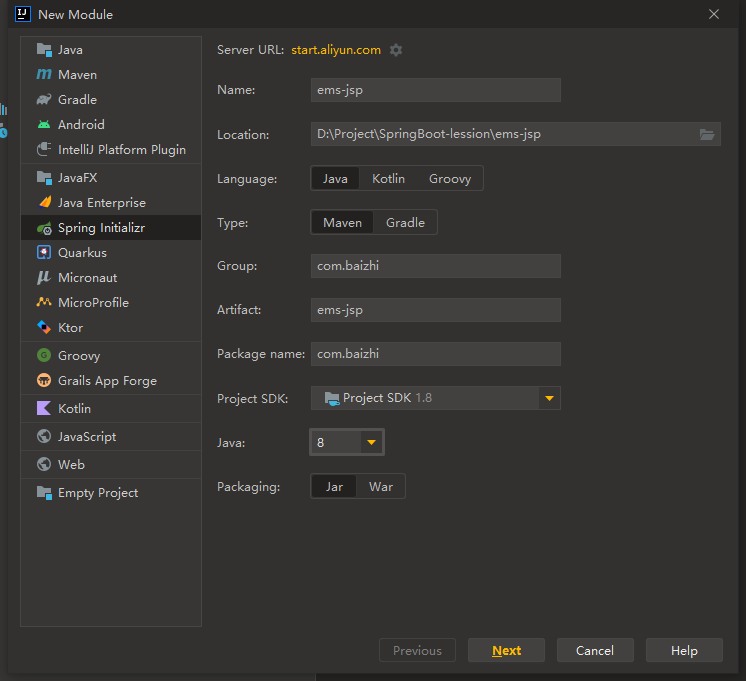
创建名为ems-jsp的项目,并引入web支持依赖,创建完成
pom.xml依赖导入
        org.springframework.boot
        spring-boot-starter-web


        org.springframework.boot
        spring-boot-starter-test
        test


        org.apache.tomcat.embed
        tomcat-embed-jasper


        com.alibaba
        druid
        1.1.19


        mysql
        mysql-connector-java


        org.mybatis.spring.boot
        mybatis-spring-boot-starter
        3.0.0


        org.springframework.boot
        spring-boot-devtools
application.yml:
# 应用服务 WEB 访问端口
server:
  port: 8989
  servlet:
    context-path: /ems-jsp
    jsp:
      init-parameters:
        development: true # 开启jsp模板开发模式

# 配置jsp展示
spring:
  mvc:
    view:
      prefix: /
      suffix: .jsp
  datasource:
    type: com.alibaba.druid.pool.DruidDataSource
    driver-class-name: com.mysql.cj.jdbc.Driver
    url: jdbc:mysql://localhost:3306/ems?characterEncoding=UTF-8
    username: root
    password: 123456

# 配置mybatis
mybatis:
  mapper-locations: classpath:com.baizhi/mapper/*.xml
  type-aliases-package: com.baizhi.entity

# 配置日志
logging:
  level:
    com.baizhi: debug
添加dao包扫描
@SpringBootApplication
@MapperScan("com.baizhi.dao")
public class EmsJspApplication {
    public static void main(String[] args) {
        SpringApplication.run(EmsJspApplication.class, args);
    }

}
业务逻辑
register.jsp
Registration Page
用户注册
${param.msg}
css
body {
    font-family: 'Arial', sans-serif;
    margin: auto;
    justify-content: center;
    align-items: center;
    width: 500px;
    height: 800px;
    /*border: 1px solid red;*/
}

.container {
    padding: 30px;
    background-color: #ffffff;
    border-radius: 8px;
    box-shadow: 0 0 15px rgba(0, 0, 0, 0.1);
    /*border: 1px solid red;*/
}

h2 {
    text-align: center;
}

input[type="text"],
input[type="password"],
input[type="submit"],
select {
    width: calc(100% - 20px);
    margin-bottom: 15px;
    padding: 10px;
    border: 1px solid #dddddd;
    border-radius: 5px;
    transition: border-color 0.3s ease-in-out;
}

input[type="text"]:focus,
input[type="password"]:focus,
select:focus {
    outline: none;
    border-color: #66afe9;
}

input[type="submit"] {
    background-color: #4CAF50;
    color: white;
    border: none;
    cursor: pointer;
    transition: background-color 0.3s ease-in-out;
}

input[type="submit"]:hover {
    background-color: seagreen;
}
验证码 实现类
package com.baizhi.utils;
import javax.imageio.ImageIO;
import java.awt.Color;
import java.awt.Font;
import java.awt.Graphics;
import java.awt.image.BufferedImage;
import java.io.FileOutputStream;
import java.io.IOException;
import java.io.OutputStream;
import java.util.Random;

public class VerifyCode {
    private int width = 100;// 定义图片的width
    private int height = 40;// 定义图片的height
    private int codeCount = 4;// 定义图片上显示验证码的个数
    private int lineCount = 20;// 定义图片上显示干扰线的条数
    private String code = null;// 定义用于保存验证码的字符串
    private BufferedImage buffImg = null;// 定义图片Buffer

    private char[] codeSequence = { 'A', 'B', 'C', 'D', 'E', 'F', 'G', 'H', 'I', 'J', 'K', 'L', 'M', 'N', 'P', 'Q', 'R',
            'S', 'T', 'U', 'V', 'W', 'X', 'Y', 'Z', '1', '2', '3', '4', '5', '6', '7', '8', '9' };

    public VerifyCode() {
        this.createCode();
    }

    /**
     * @param width
     *            图片宽
     * @param height
     *            图片高
     */
    public VerifyCode(int width, int height) {
        this.width = width;
        this.height = height;
        this.createCode();
    }

    /**
     * @param width
     *            图片宽
     * @param height
     *            图片高
     * @param codeCount
     *            字符个数
     * @param lineCount
     *            干扰线条数
     */
    public VerifyCode(int width, int height, int codeCount, int lineCount) {
        this.width = width;
        this.height = height;
        this.codeCount = codeCount;
        this.lineCount = lineCount;
        this.createCode();
    }

    public void createCode() {
        int x = 0, fontHeight = 0, codeY = 0;
        int red = 0, green = 0, blue = 0;

        x = width / (codeCount + 2);// 每个字符的宽度
        fontHeight = height - 2;// 字体的高度
        codeY = height - 4;

        // 图像buffer
        buffImg = new BufferedImage(width, height, BufferedImage.TYPE_INT_RGB);
        Graphics g = buffImg.createGraphics();
        // 创建一个随机数生成器类
        Random random = new Random();
        // 将图像填充为白色
        g.setColor(Color.WHITE);
        g.fillRect(0, 0, width, height);
        // 创建字体,字体的大小应该根据图片的高度来定。
        Font font = new Font("Fixedsys", Font.PLAIN, fontHeight);
        // 设置字体。
        g.setFont(font);

        for (int i = 0; i
验证码生成 请求
@Controller
@RequestMapping("user")
public class UserController {

    /**
     * 生成验证码
     */
		@ResponseBody
    @RequestMapping("verifyCode")
    public Map verifyCode(HttpServletRequest request) throws IOException {
        Map map = new HashMap();
        // 1.使用工具类生成验证码
        VerifyCode vc = new VerifyCode(120, 40, 4, 100);
        String code = vc.getCode();
        map.put("code", code);
        // 2. 获取验证码的BufferedImage对象
        BufferedImage captchaImage = vc.getBuffImg();
        //4.将图片转为base64 [放入src,可以直接显示图片]
        ByteArrayOutputStream outputStream = new ByteArrayOutputStream();
        ImageIO.write(captchaImage, "png", outputStream);
        byte[] imageBytes = outputStream.toByteArray();
        String image = "data:image/png;base64," + Base64Utils.encodeToString(imageBytes);
        map.put("image", image);
        return map;
    }
}
业务逻辑

Service
@Service
@Transactional
public class UserServiceImpl implements UserService {

    @Autowired
    private UserDao userDao;

    @Override
    public void register(User user) {
        User userDB = userDao.findByUserName(user.getUsername());
        if (!ObjectUtils.isEmpty(userDB)) {
            throw new RuntimeException("用户名已存在");
        }
        // 注册之前给密码进行加密
        String passwordSecret = DigestUtils.md5DigestAsHex(user.getPassword().getBytes(StandardCharsets.UTF_8));
        user.setPassword(passwordSecret);
        userDao.save(user);

    }
}
mapper语句
api
@Autowired
private UserService userService;

@RequestMapping("register")
public String register(User user, String code, HttpSession session) {
    log.debug("接受的验证码:{}", code);
    log.debug("User:{}", user);
    // 比较验证
    try {
        String sessionCode = session.getAttribute("code").toString();
        if (!sessionCode.equalsIgnoreCase(code)) {
            throw new RuntimeException("验证码输入错误!!!");
        }
        userService.register(user);
    } catch (RuntimeException e) {
        e.printStackTrace();
        return "redirect:/register.jsp?msg=" + UriEncoder.encode(e.getMessage());
    }
    return "redirect:/login.jsp";
}

login.jsp
Login Page
用户登录
${param.msg}
ServiceImpl
@Override
public User login(String username, String password) {
    //1. 根据用户名查询数据库是否存在
    User user = userDao.findByUserName(username);
    //2.判断对象是否存在
    if (ObjectUtils.isEmpty(user)) {
        throw new RuntimeException("用户名输入错误!");
    }
    //3.判断密码正确性
    String digestPassword = DigestUtils.md5DigestAsHex(password.getBytes(StandardCharsets.UTF_8));
    if (!user.getPassword().equals(digestPassword)) {
        throw new RuntimeException("密码错误!");
    }
    return user;
}
UserController
@RequestMapping("login")
public String login(String username, String password,HttpSession session) throws UnsupportedEncodingException {
    log.debug("接受到的用户名:{},接收到的密码:{}", username, password);
    try {
        // 1.执行登录业务逻辑
        User user = userService.login(username, password);
        // 2.登录成功,保存用户信息
        session.setAttribute("user", user);
    } catch (Exception e) {
        e.printStackTrace();
        return "redirect:/login.jsp?msg=" + UriEncoder.encode(e.getMessage());
    }
    return "redirect:/emplist.jsp";
}
emplist.jsp
用户列表
emplist.css
body {
    font-family: Arial, sans-serif;
    margin: 0;
    padding: 0;
}

#container {
    max-width: 800px;
    margin: 0 auto;
    padding: 20px;
}

h2 {
    text-align: center;
}
table {
    width: 100%;
    border-collapse: collapse;
    margin-bottom: 20px;
}

th, td {
    padding: 10px;
    text-align: left;
    border: 1px solid #ccc;
}

thead {
    background-color: #f2f2f2;
}

div > button {
    margin: 5px;
    padding: 5px 10px;
    border: none;
    background-color: #007bff;
    color: #fff;
    cursor: pointer;
}

div > button:hover {
    background-color: #0056b3;
}

select, button {
    padding: 5px;
}

div > span {
    margin: 0 10px;
    font-weight: bold;
}

label {
    font-weight: bold;
}
Service
@Service
@Transactional
public class EmployeeServiceImpl implements EmployeeService {

    private final EmployeeDao employeeDao;

    @Autowired
    public EmployeeServiceImpl(EmployeeDao employeeDao) {
        this.employeeDao = employeeDao;
    }

    @Override
    public List list() {
        return employeeDao.list();
    }
}
EmployeeController
@Controller
@RequestMapping("employee")
public class EmployeeController {

    private EmployeeService employeeService;

    @Autowired
    public EmployeeController(EmployeeService employeeService) {
        this.employeeService = employeeService;
    }

    /**
     * 员工列表
     *
     * @return
     */
    @RequestMapping("list")
    public String listEmployee(HttpServletRequest request, Model model) {
        //1. 获取员工列表
        List employees = employeeService.list();
//        request.setAttribute("employees", employees);
        model.addAttribute("employees", employees);
        return "emplist";
    }
}
addEmp.jsp
添加员工
添加员工
addEmp.css
body {
    font-family: Arial, sans-serif;
    margin: 0;
    padding: 0;
}
#container {
    max-width: 800px;
    margin: 0 auto;
    padding: 20px;
}

h2 {
    text-align: center;
}
table {
    width: 100%;
    border-collapse: collapse;
    margin-bottom: 20px;
    color: #212529;
}
td, th {
    vertical-align: top;
    padding: 10px;
    text-align: left;
    border: 1px solid #ccc;
}
input[type="text"], input[type="date"], select {
    width: 60%;
    padding: .375rem .75rem;
    border: 1px solid #ced4da;
    border-radius: .25rem;
}
input[type="submit"] {
    color: #fff;
    background-color: #007bff;
    border-color: #007bff;
    padding: .375rem .75rem;
    border-radius: .25rem;
}
EmployeeDaomapper.xml
INSERT INTO `ems`.`employee`(`id`, `name`, `birthday`, `salary`, `gender`) VALUES (#{id},#{name},#{birthday},#{salary},#{gender});
EmployeeServiceImpl
public void addEmployee(Employee employee) {
    employeeDao.add(employee);
}
Controller
@RequestMapping("add")
public String addEmployee(Employee employee) {
    log.debug("员工信息:{}", employee);
    //1. 保存员工信息
    employeeService.addEmployee(employee);
    return "redirect:/employee/list";
}
显示员工信息
UpdateEmp.jsp
修改员工信息
修改员工信息
UpdateEmp.css
body {
    font-family: Arial, sans-serif;
}

#container {
    width: 300px;
    margin: 0 auto;
    padding: 20px;
    border: 1px solid #ccc;
    border-radius: 5px;
    background-color: #f8f8f8;
}

h2 {
    text-align: center;
    color: #333;
}

label {
    font-weight: bold;
    color: #555;
}

input[type="text"], input[type="date"],select {
    width: 70%;
    padding: 10px;
    margin: 5px 0 15px;
    border: 1px solid #ccc;
    border-radius: 3px;
}

input[type="submit"] {
    width: 100%;
    padding: 10px;
    color: white;
    background-color: #007BFF;
    border: none;
    border-radius: 3px;
    cursor: pointer;
}

input[type="submit"]:hover {
    background-color: #0056b3;
}
Controller
@RequestMapping("detail")
public String detailEmployee(Integer id, Model model) {
    log.debug("接收的id:{}",id);
    Employee employee = employeeService.idByEmployee(id);
    model.addAttribute("employee", employee);
    return "updateEmp";
}
更改员工信息
Controller
@RequestMapping("update")
public String updateEmployee(Employee employee) {
    log.debug("修改的员工信息:{}", employee);
    employeeService.updateEmployee(employee);
    return "redirect:/employee/list";
}
emplist.jsp
删除
Controller
@RequestMapping("delete")
public String deleteEmployee(Integer id) {
    log.debug("接收的id:{}", id);
    employeeService.deleteEmployee(id);
    return "redirect:/employee/list";
}
mapper
delete from `employee`where id =#{id}
作者:扬眉剑出鞘
出处: https://www.cnblogs.com/eyewink/
本文版权归作者和博客园共有,欢迎转载,但未经作者同意必须保留此段声明,且在文章页面明显位置给出原文连接,否则保留追究法律责任的权利。
 登录查看全部
参与评论
手机查看
返回顶部